Landed Costs and Imports
See what transport, forwarding and customs add to each received item, and finalize its purchase cost.
Goods cost more than the supplier's price once transport, forwarding and customs are paid. Prospect adds those costs to the items they belong to, so stock is valued at what it really cost.
How a cost reaches the goods
Receive the goods and post the supplier's goods invoice. It sets the purchase value of each received item.
Record the transport, forwarding or handling invoice as an Additional purchase cost and point each line at the goods-received notes it belongs to. Posting it opens a cost review for those receipts, or adds to the one already open.
For an import, open the review and choose Add import summary. Enter the customs declaration's duty, import VAT and excise, and whether you paid customs directly or the forwarder recharged them.
Check the review and choose Finalize. Finalizing needs its own permission.
Reading a cost review
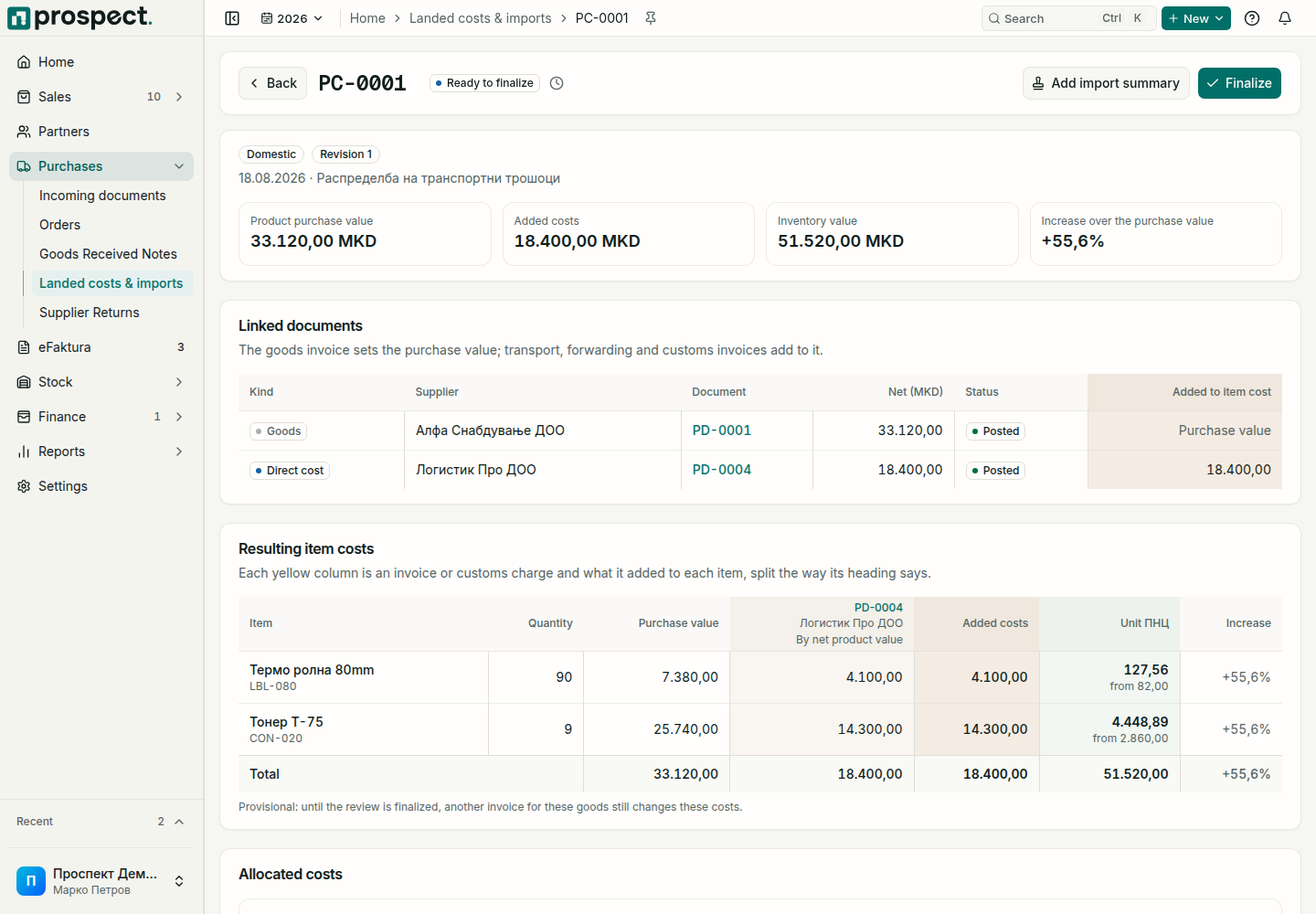
- Linked documents lists each supplier document with its net amount in MKD, its status and what it added to the items. The goods invoice is the purchase value itself.
- Resulting item costs has a row per received item and a yellow column per cost invoice or customs charge. Under each column's heading is how that cost was split: by net value, quantity or weight. The last columns are the item's added costs, its unit cost with the purchase price under it, and how far the cost rose over the purchase value.
- Allocated costs lets you split a cost line differently with Advanced allocation, until the review is finalized.
Customs duty, excise and non-recoverable import VAT become part of the items' cost. Recoverable import VAT does not: you claim it back instead.
Where to find them
- Purchases → Landed costs & imports lists every review that adds something to the goods. Routine purchases, where the goods invoice is the whole cost, are finalized automatically and do not appear.
- A goods-received note shows the same table for its own lines under Purchase cost, with Open cost review.
- A supplier invoice links to its review under Purchase cost trace.
Good to know
Until a review is finalized its costs are provisional: another invoice pointed at the same receipts changes them. Finalizing writes the values into stock valuation and recalculates the later movements of those items. An invoice that arrives after that opens a new revision of the review instead of changing the finalized one. To undo a finalized review, choose Reverse on it; do not post an unrelated offset to hide the difference.